

Customize Your Loot with FilterBlade
About FilterBlade
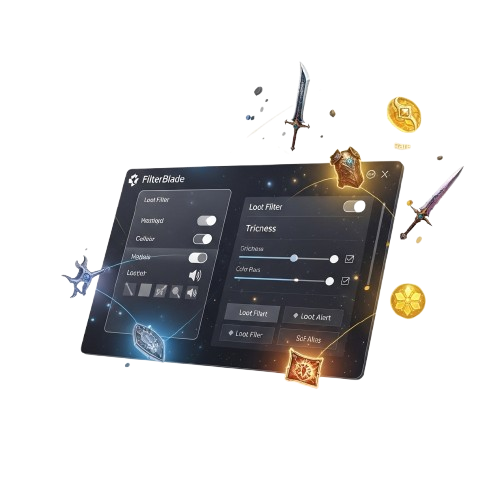
FilterBlade is designed to make loot filter customization simple, powerful, and accessible for every Path of Exile player. Whether you’re adjusting strictness for early leveling or optimizing endgame farming, FilterBlade removes the complexity of manual coding and gives you full visual control in just a few clicks.
We believe your gameplay should be focused, efficient, and free from unnecessary clutter. That’s why FilterBlade provides real-time previews, customizable sounds, color themes, and advanced item highlighting options. Powered by NeverSink’s widely trusted loot filter system, it ensures you always see what matters most during every league.
Built with both beginners and veteran players in mind, FilterBlade combines flexibility with an intuitive interface. Our goal is to deliver a modern loot filtering experience that enhances performance, improves clarity, and helps you maximize rewards while enjoying a cleaner Path of Exile journey.
FilterBlade Features
Custom Strictness Levels
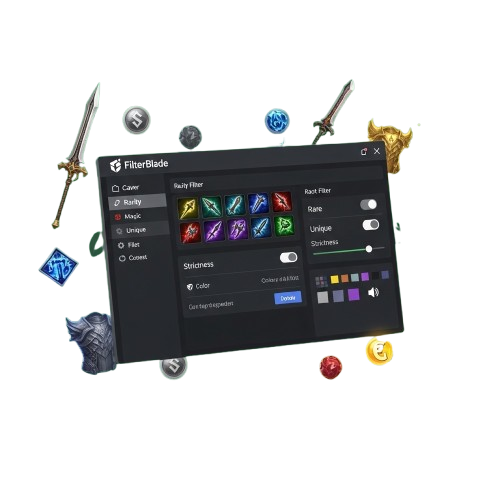
Adjust loot visibility using flexible strictness presets for leveling mapping and deep endgame farming keeping your screen clean focused and optimized to highlight only the most valuable and relevant drops.

Real-Time Filter Preview
Preview visual color and sound adjustments instantly before exporting your filter ensuring precise customization without repeated in game testing saving time and avoiding unnecessary configuration errors.

Advanced Color Customization
Customize item text colors background highlights borders and font emphasis to create a sharper cleaner and highly readable loot display tailored perfectly to your personal gameplay preferences.

Sound Alert Controls
Assign unique drop sounds to currency rare crafting bases and valuable unique items so you never miss critical rewards during boss fights high intensity mapping or fast paced farming sessions.

League & Economy Updates
Stay updated with presets aligned to new league mechanics and shifting item values helping you prioritize profitable drops relevant crafting bases and meta focused gear throughout progression.

Easy Export & Download
Export your customized filter instantly and sync it directly with your Path of Exile account enabling smooth activation without manual file editing complicated steps or technical knowledge.

Beginner-Friendly Interface
Navigate a clean intuitive interface designed for new players and experienced veterans eliminating scripting complexity while maintaining powerful flexible and fully controlled customization tools.

NeverSink Integration
Built around NeverSink trusted loot filter foundation delivering reliable performance accurate highlighting balanced strictness tiers and community tested optimization for every active league cycle.

How FilterBlade Works?
Select Your Items
Choose specific item categories, rarity, and crafting bases in FilterBlade. Tailor which drops appear on screen, including currency, unique item, and gems, to streamline gameplay and highlight on essential loot.
Adjust Strictness Levels
Apply dynamic strictness presets for leveling, mapping, and endgame farming. Control the visibility of low-value and high-value items to reduce screen clutter and focus on drops that matter most.
Customize Colors & Highlights
Set text colors, background highlights, borders, and font emphasis for every item tier. Make your loot visually clear, quickly recognizable, and highly readable for efficient in-game decision.
Sync with NeverSink
Integrate directly with NeverSink filters. Update your presets with the latest league mechanics, item economy changes and community-tested that must optimizations for reliable and efficient gameplay.
Export & Install Filter
Export your fully customized filter in a format ready for Path of Exile. Install it quickly by replacing your existing filter or adding it as a new one, all without manually editing files or risking errors in-game.
Continuous Updates
Receive notifications for updates or new league presets. FilterBlade ensures your filters remain accurate, current, and optimized to highlight the most profitable and meta-relevant items throughout the season.
Why Choose FilterBlade
FilterBlade is the fastest, most efficient, and easiest way to customize your Path of Exile loot filters. Whether for leveling, mapping, or endgame, it ensures precise item visibility, color coding, and sound alerts for a fully optimized gameplay experience.
Download FilterBlade
Get FilterBlade for Path of Exile and start customizing your loot filters instantly. Whether you’re using Windows, macOS, or running the game on standard setups, FilterBlade lets you adjust item visibility, colors, sounds, and presets quickly and securely. With simple installation and ready-to-use presets, you can enjoy optimized, efficient, and precise loot management anytime.
System Requirements for FilterBlade
Operating Systems: Windows 7 / 8 / 10 / 11, macOS 10.12 or higher
Browser Support: Chrome, Firefox, Edge, Safari (for FilterBlade web version)
Internet: Required for updates, presets, and syncing with NeverSink filters
Installation Guide
FilterBlade makes customizing your Path of Exile loot filters simple, fast, and safe. Follow these steps to download, set up, and start using presets efficiently without errors.
Download Installer
Visit the official FilterBlade website and download the installer or web tool for your system. Make sure to select the correct version for Windows, macOS, or browser use to ensure smooth.
Open & Launch
Open the downloaded file or web link and launch FilterBlade. The interface is intuitive, guiding you through setup without requiring advanced technical skills for quick access.
Customize Settings
Adjust your filter preferences, color codes, sound alerts, and strictness presets. FilterBlade allows easy modifications to match leveling, mapping, or endgame farming needs.
Apply & Export
Once configured, export your customized loot filter. Install it in Path of Exile safely by replacing your current filter or adding a new one without risking errors and any issue.
Your Loot Filters, Secure & Optimized
FilterBlade ensures your Path of Exile loot filters are always safe, optimized, and fully customizable. Adjust settings, apply presets, and manage filters confidently with complete control.
End-to-End Security
FilterBlade keeps all your custom loot filter files secure during creation, editing, and export. Unauthorized changes are blocked, ensuring your presets remain fully protected.
Custom Preset Controls
Every filter preset in FilterBlade can be fully adjusted for leveling, mapping, or endgame farming. Users can apply multiple strictness levels for optimal gameplay efficiency.
Direct Game Integration Tool
FilterBlade exports filters ready for Path of Exile directly. Replace existing filters or add new ones safely without manual edits or risking in-game errors.
Optimized Performance
FilterBlade runs efficiently in-browser or on desktop. Changes, previews, and updates are processed quickly, allowing you to test and apply filters instantly with no delays.
What Players Say About FilterBlade
Frequently Asked Questions
FilterBlade FAQs answer common questions about loot filter customization, presets, exporting, and game integration. Learn how to adjust visibility, import/export filters, and optimize your Path of Exile experience efficiently.
Filter Setup
How do I import a filter into FilterBlade?
You can import any Path of Exile filter into FilterBlade by selecting the import option, ensuring the format matches supported file types for seamless editing.
Can I create a new filter from scratch?
Yes, FilterBlade allows creating filters from scratch. Choose your base preset, adjust item visibility, and save it in the correct format for use in Path of Exile.
Does FilterBlade support multiple presets?
Absolutely, you can apply multiple strictness presets for leveling, mapping, or endgame farming to match your exact gameplay preferences and goals.
How do I adjust item visibility?
Select the desired item category, adjust the slider for strictness, and FilterBlade updates the filter instantly with your chosen visibility settings.
Can I revert changes to a filter?
Yes, FilterBlade has an undo option to revert edits to your filter, restoring previous visibility settings without losing your customizations.
Are my custom filters saved automatically?
Custom filters must be saved manually. FilterBlade ensures your edits are preserved in the correct format for immediate export and Path of Exile integration.
Presets & Strictness
What are the strictness presets in FilterBlade?
FilterBlade offers presets like “Easy,” “Normal,” “Hard,” or “Endgame,” letting you adjust loot visibility to suit leveling, farming, or mapping stages efficiently.
Can I customize preset values?
Yes, each preset can be fully customized. Adjust item visibility, font size, and color settings to optimize your filter for personal preferences.
Do presets affect all item types?
Presets apply globally but can be fine-tuned per item type. You can increase visibility for rares while hiding common items for a cleaner interface.
Can I save my own presets?
Absolutely. FilterBlade allows creating custom presets, which you can save, load, or export for future sessions or sharing with others.
How does changing strictness impact gameplay?
Changing strictness alters how items appear in-game. Higher strictness hides lower-tier items, helping focus on valuable loot during farming or mapping.
Are presets compatible with imported filters?
Yes, imported filters can have presets applied. FilterBlade recalculates item visibility according to the selected preset without overwriting your custom edits.
Export & Integration
How do I export a filter for Path of Exile?
After customizing your filter, click export. FilterBlade generates a file ready for Path of Exile installation, either replacing your old filter or adding a new one.
Can I install the exported filter directly in-game?
Yes, the exported file is formatted for direct integration. Copy it to your Path of Exile filters folder for immediate in-game use without manual edits.
Does FilterBlade support updating existing filters?
You can update filters by importing an existing one, editing it, and exporting it again. This allows seamless updates without overwriting unrelated settings.
Can I export multiple filters at once?
Yes, FilterBlade allows batch export. Select multiple customized filters, and each will be saved in the correct format for quick Path of Exile deployment.
Is the exported filter compatible with all game versions?
Exported filters are compatible with supported Path of Exile versions. Make sure your game is up to date to avoid visibility or formatting issues.
Can I share my filters with friends?
Yes, export filters and send them as files or upload them online. Your friends can import them directly into FilterBlade or Path of Exile.
Troubleshooting & Support
My filter isn’t showing in-game, what should I do?
Ensure you exported it correctly, placed it in the Path of Exile filters folder, and enabled it in the in-game filter settings menu.
Why are some items still visible after applying strictness?
Certain items may be hard-coded in Path of Exile. Adjust FilterBlade settings or use a stricter preset to hide low-tier or unwanted items.
Can FilterBlade fix corrupted filters?
Yes, import a corrupted filter and FilterBlade will parse it. You can save a repaired version, ensuring it’s compatible with the latest game version.
I’m getting errors when exporting, how can I fix it?
Check that your filter name contains only supported characters and that you have write permissions in the export folder before retrying.
Is there official support for FilterBlade?
Yes, the creator Neversink provides documentation, guides, and a community for troubleshooting issues and learning how to use advanced features.
Why doesn’t my filter update in-game?
Make sure Path of Exile is restarted after replacing the filter, and verify that the correct file is active in the game’s filter settings menu.
FilterBlade – Smart Loot Control Tool
FilterBlade delivers smart loot control with advanced filters, customization, and optimized item visibility to enhance gameplay performance and efficiency.
Price: Free
Price Currency: $
Operating System: Windows
Application Category: Software
4.7